Made for multiple locations
Discover available sub-accounts through your GHL connection and enable the ones you want to sync.
DataCharted Sync
Connect your agency’s CRM data to a warehouse you own. Choose your locations and datasets, schedule syncs, and see what happened on every run.
BigQuery is the destination. Your reporting tools build on it.
 DataCharted SyncProduct workflow
FROM CRM TO WAREHOUSE
DataChartedYour scheduleStructured source data. A flexible reporting foundation.
Discover available sub-accounts through your GHL connection and enable the ones you want to sync.
Data lands in the BigQuery project you connect. Build your reporting layer with the tools you choose.
The sync reads GoHighLevel records. It does not create, edit, or delete data in your CRM.
From connection to clarity
Authorize access and discover the locations available to your agency.
Connect with a service account, or Google sign-in when available. Verify the destination.
Enable locations and choose from 12 datasets. Review each stream’s supported sync mode.
Verify the first run, set a recurring schedule, and choose your notification preferences.
Visibility comes built in
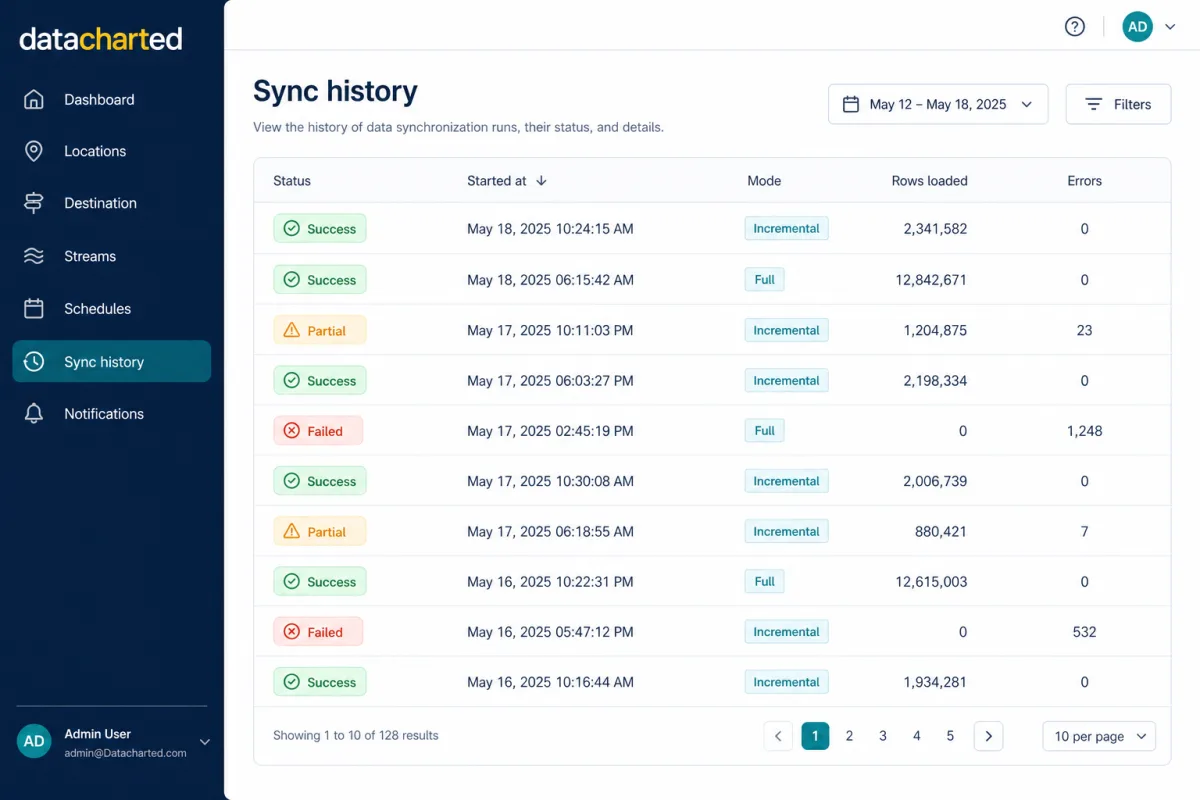
A pipeline should be easy to understand. Review the status, row counts, and errors for each run, then dig into a stream when something needs attention.
The data behind your decisions
Start with contacts and opportunities. Add inbound calls, appointments, submissions, and the definitions that give them context.
Explore the data catalogueFour datasets support incremental or full-refresh runs. The others use full refresh. Contact edits require a full refresh; SMS and email messages are not included.
Before you connect
DataCharted Sync is a connector that loads structured source tables into BigQuery. You build your metrics and dashboards on that foundation. We can help with models and dashboards through our consulting services.
No. The hosted product currently supports the 12 datasets in our catalogue. It does not export general SMS/email conversations or an agency-level Locations warehouse table.
Syncs run manually or on a schedule. Freshness depends on the schedule, API responses, run duration, and stream behavior. Inbound calls use a short settling window before extraction.
Agency Sync starts at US$149/month for up to 10 enabled locations. Plans are arranged with us before paid activation. See pricing and setup options. Google Cloud charges are separate.
You need access to authorize your GoHighLevel agency and a BigQuery project with the required permissions. If you’re starting without a warehouse or reporting team, ask about guided setup.
Start with the connection. Build your next reporting layer.